 Spacing and Sizes
 View in Figma
Introduction
Our design system uses a 4px baseline grid to ensure consistent spacing and sizing across all elements. This approach helps maintain visual harmony and alignment throughout the interface. All spacing (gap, padding, margin, line-height) and sizing (width, height) values are divisible by 4.
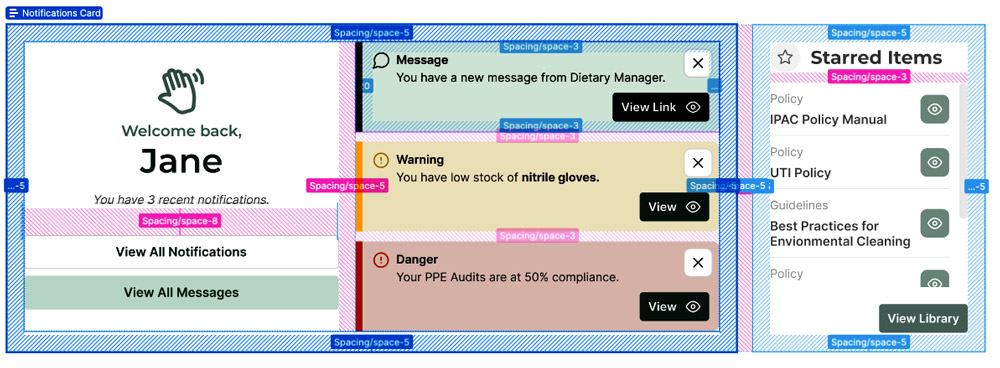
Usage
To maintain consistency, always use these predefined variables for spacing and sizing. This ensures that all elements align perfectly with the 4px baseline grid, creating a cohesive and visually appealing design.
Spacing Variables
- space-0: 0
- space-1: 4px (0.25rem)
- space-2: 8px (0.5rem)
- space-3: 12px (0.75rem)
- space-4: 16px (1rem)
- space-5: 20px (1.25rem)
- space-6: 24px (1.5rem)
- space-7: 28px (1.75rem)
- space-8: 32px (2rem)
- space-9: 36px (2.25rem)
- space-10: 40px (2.5rem)
For anything larger, you do not have to use variables, but keep the numbers divisible by 4.
Spacing Example 1:
space-4 is used for a gap between elements here:
Spacing Example 2:
space-10 is used for padding around this element:
Sizing Variables
- size-0: 0
- size-1: 4px (0.25rem)
- size-2: 8px (0.5rem)
- size-3: 12px (0.75rem)
- size-4: 16px (1rem)
- size-5: 20px (1.25rem)
- size-6: 24px (1.5rem)
- size-7: 28px (1.75rem)
- size-8: 32px (2rem)
- size-9: 36px (2.25rem)
- size-10: 40px (2.5rem)
For anything larger, you do not have to use variables, but keep the numbers divisible by 4.
Sizing Example 1:
size-10 is used for this elements width and height:
Sizing Example 2:
size-5 is used for this paragraphs font size:
Lorem ipsum dolor sit amet consectetur adipisicing elit.
CSS Examples
.element {
  margin: var(--space-4); /* 16px */
  padding: var(--space-2); /* 8px */
  width: var(--size-8); /* 32px */
  height: var(--size-6); /* 24px */
  }